5 Minute Workshops

Workshop 28Track: Get More ClientsTime: About 5 minutesFor: Real estate agents

How to Turn One Compelling Reason Into a Simple Infographic

A good infographic helps a prospect understand one useful message quickly.

The trouble starts when an agent tries to fit every service, award, promise, and contact detail into one design. The message gets buried, and the infographic becomes a crowded advertisement.

In this workshop, you'll learn how to build a simple infographic around one Compelling Reason so the main benefit stays easy to see and remember.

01By The End Of This Workshop

You'll have a simple content outline that can turn one Compelling Reason into a focused infographic.

02What You'll Learn

  • Why one infographic should focus on one Compelling Reason
  • Which four parts give the message a clear visual order
  • How to create an infographic outline before choosing the design

03The Problem

Most prospects won't stop to study a crowded infographic. They scan the headline, notice a few visual details, and decide whether the message is worth more attention.

If the design presents several competing ideas, the prospect might miss the most important one. Bigger type, brighter colors, and more icons won't fix a message that lacks focus.

Your Compelling Reason should guide the entire infographic. Every headline, supporting point, image, and call to action should help explain or support that one message.

If an element doesn't help the prospect understand the Compelling Reason, it probably doesn't belong in the design.

04The Simple Lesson

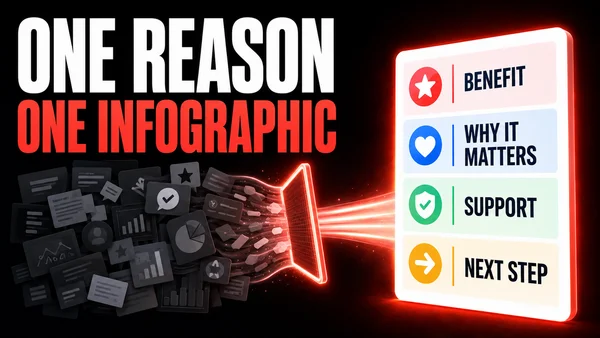
Build the infographic as one short visual story with four parts:

  • Benefit headline: State the result the prospect cares about.
  • Why it matters: Name the problem, concern, or desire that makes the benefit important.
  • Support: Add up to three facts, steps, or proof points that make the Compelling Reason credible.
  • Next step: Tell the prospect what to do if the message feels relevant.

This order moves the prospect from interest to understanding. It also gives the designer a clear path to follow.

Keep the supporting points short. An infographic should make the message easier to understand. It shouldn't force the reader to work through long paragraphs.

Write the content outline first. Then choose the photos, icons, colors, and layout that make the story easier to follow.

05Real Estate Example

Imagine an agent who provides every seller with a useful weekly update. That service could support this Compelling Reason:

You'll always know where your sale stands because you'll receive a clear update on buyer activity, feedback, and the next recommended step.

The infographic could use this simple outline:

  • Headline: Never Wonder What Is Happening With Your Home Sale
  • Why it matters: Silence creates stress and leaves sellers guessing.
  • Support: Buyer activity, showing feedback, and the next recommended step
  • Next step: Ask what your weekly seller update will include.

The design now has one job: make that seller benefit clear. This example should be used only by an agent who actually provides the service described.

06What This Means For Your Marketing

Your 12 Compelling Reasons To Do Business With You can become 12 separate infographic ideas. Each infographic can give one benefit enough room to be understood.

Don't squeeze all 12 into one design. Give each Compelling Reason its own visual story, then share those stories over time.

An infographic can explain the message. A Virtually Branded Scene can pair that same message with your website and Visual Social Proof. Using different formats around the same Compelling Reason keeps the content fresh while Spaced Repetition helps the message become more familiar.

The design can change. The core meaning should stay consistent.

075-Minute Action Step

Choose one approved Compelling Reason and complete these four lines:

  • Benefit headline: What does the prospect get?
  • Why it matters: What concern or desire makes this important?
  • Three supporting points: What facts, actions, or proof support it?
  • Next step: What should an interested prospect do?

Read the four parts from top to bottom. Remove anything that doesn't help explain or support the Compelling Reason.

Five minutes is the goal, not a cutoff. Take a little extra time if more research or thought will improve your result.

08Your Result

You should now have a focused content outline for one simple infographic. The message has a clear benefit, a reason it matters, credible support, and a next step.

09Put It To Work

Your outline can now guide the infographic design or give a designer, team member, or VA clear direction.

You can also reuse the same Compelling Reason in an email, short video, social post, or Virtually Branded Scene. Build the remaining 12 Compelling Reasons the same way, and you'll have the foundation for a consistent recognition campaign featuring your own website and messages.